


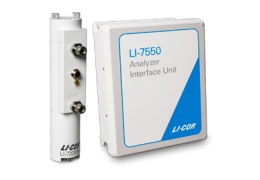
System diagnostics
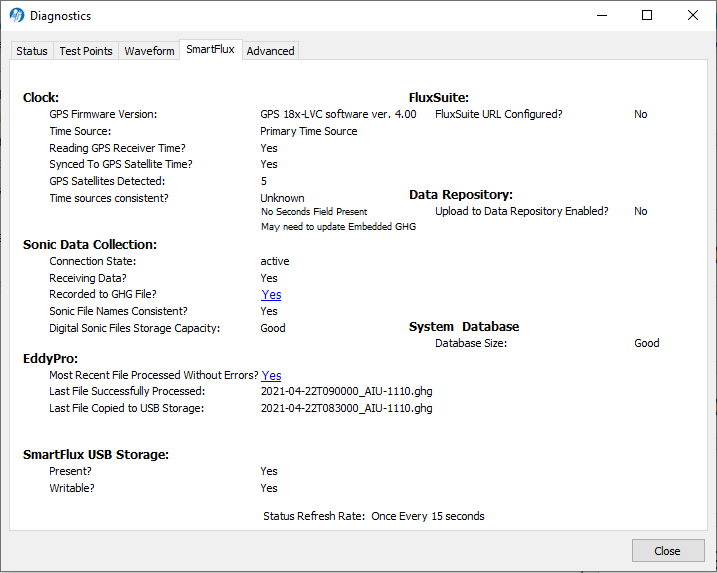
SmartFlux Core System diagnostics are supported by the combined release of win-GHG interface software v8.8.36 and SmartFlux Core System embedded firmware v2.2.50. This feature serves to summarize the system performance by providing status indicators for components and configurations, allowing you to evaluate the system at a glance. Diagnostics are under Diagnostics > SmartFlux tab.

Note: Diagnostics are updated every 15 seconds except when the SmartFlux Core System is executing an EddyPro run, as indicated by a banner:

Diagnostics refresh at the conclusion of the run (typically 7 to 15 minutes).
To support this feature, the win-GHG application attempts to open port 5050 for communication with the SmartFlux Core System. If the local network prohibits opening port 5050, you will be presented an error message stating that the connection is not possible because port 5050 may be blocked. Contact your network administrator for assistance. If using win-GHG software v8.8.36 and SmartFlux v2.2.49 or earlier, the SmartFlux Diagnostics are not available.
Clock
Clock diagnostics show the time keeping status to help with troubleshooting of timing issues.
| Issue | Status | Description |
|---|---|---|
| GPS Firmware Version: | ||
| Message | GPS 18x-LVC software ver. 4.3, for example. Compatible firmware versions are 3.8, 3.9, and 4.3 or newer. If the antenna reports 3.7 or older, 4.0, 4.1, or 4.2, replace the antenna with a newer model for reliable performance. Contact LI-COR or your representative for more details. | |
| Unknown | Unable to retrieve information at this time. Typically, wait 15 to 20 more seconds for the information to refresh. | |
| Time Source: | ||
| Primary | Precision Time Protocol is running on the SmartFlux Core System in preferred mode. GPS time in the SmartFlux Core System is the primary clock. | |
| Secondary | Precision Time Protocol is running on the SmartFlux Core System in slave mode. The SmartFlux Core System is not the primary clock. | |
| Reading GPS Receiver Time? | ||
| Yes | GPS receiver is providing valid time. | |
| No | GPS receiver time not valid. Receiver positioned poorly (inside)? Cable unplugged? Failed receiver or cable? | |
| Synced to GPS Satellite Time? | ||
| Yes | System clock is synced with the GPS satellite time. | |
| No | System clock is out of sync with GPS satellite time. | |
| GPS Satellites detected: | ||
| # of satellites detected. May be 0 when in a building. >4 is ideal. | ||
| Time sources consistent? | ||
| Yes | The win-GHG software was able to sample the clocks on both the SmartFlux Core System and the LI-7550 or DSI and determined that they were satisfactorily synchronized. | |
| No | The two clocks are >2 minutes off. If NO, an error icon will be displayed next to the Time Sources Consistent line and both the SmartFlux Epoch Time and GHG Epoch Time1 will be displayed underneath for diagnostic purposes. To troubleshoot time issues:
|
|
Sonic Data Collection
Sonic data collection shows the status of the sonic anemometer and SmartFlux Core System anemometer data handling.
| Issue | Status | Description |
|---|---|---|
| Connection State | ||
| Active | The SmartFlux Core System is configured and able to receive data from the sonic anemometer. | |
| Pending | The SmartFlux Core System is attempting to connect with the anemometer and is not yet able to collect data. | |
| Receiving Data? | ||
| Yes | The SmartFlux Core System is receiving data from the sonic anemometer. | |
| No | The SmartFlux Core System is NOT receiving data from the sonic anemometer. | |
| Recorded to GHG file? | ||
| Yes | The SmartFlux Core System was able to align the high-speed anemometer data and gas data and save the file. | |
| No | The SmartFlux Core System was unable to align the high-speed anemometer and gas data. Expect the next EddyPro run to fail. | |
| Click Yes/No to view the log for more details (see Sonic data collection information). Copy the log to the clipboard with Ctrl + C for consultation with a LI-COR technician. | ||
| Sonic File Names Consistent: | ||
| Yes | The SmartFlux Core System has recorded anemometer data files that have consecutive time stamps. | |
| No | Raw anemometer data files have non-consecutive time stamps. If a response of NO is not resolved after rebooting the SmartFlux Core System, contact LI-COR for assistance. | |
| Digital Sonic File Storage Capacity | ||
| Good | Anemometer data files stored on the SmartFlux Core System are within the allotted storage space. | |
| Exceeded | Anemometer data stored has exceeded the storage allotment, indicating a data management issue. These files are normally deleted automatically. Contact LI-COR for assistance. | |
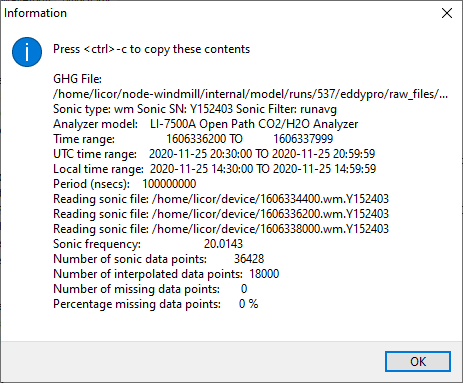
Sonic data collection information
Click Yes/No next to Recorded to GHG file? to view the logging information.
| Entry | Description |
|---|---|
| GHG file: | The .ghg file that is recorded in temporary storage. |
| Sonic type: | The model, serial number, and filter setting of the anemometer. |
| Analyzer model: | The CO2/H2O gas analyzer model. |
| Time range: | Beginning and ending time in seconds past the universal epoch2. |
| UTC time range: | Beginning and ending time in UTC. |
| Local time range: | Beginning and ending time in local time. |
| Period (nsec): | |
| Reading sonic file: | Temporary sonic data files are listed old to new. Names are the epoch time value, anemometer model, and serial number, separated by dots (.). |
| Sonic frequency: | Measurement frequency of the anemometer in Hz or samples per second. |
| Number of sonic data points: | Total number of anemometer points over the period. |
| Number of interpolated data points: | Total number of anemometer data points recorded to the .ghg file. |
| Number of missing data points: | Points missing from the expected total. |
| Percentage of missing data points: | Percentage of points missing from the expected total. |
EddyPro
EddyPro diagnostics indicate the status of EddyPro processing on the SmartFlux Core System.
| Issue | Status | Description |
|---|---|---|
| Most Recent File Processed Without Errors? | ||
| Yes | Most recent dataset processed successfully. | |
| No | Unable to process most recent data set. | |
| Click Yes/No to view the EddyPro run log. You can copy the log to the clipboard with Ctrl + C for consultation with a LI-COR technician. | ||
| Last File Successfully Processed: | ||
| <filename> | This is the last file on the SmartFlux Core System that was processed without error. | |
| Last File Copied to USB Storage: | ||
| <filename> | The last file copied to the USB drive. Note that a failed EddyPro run will not be copied. This file name will match the last successfully processed file name if everything is working correctly. | |
SmartFlux USB Storage
SmartFlux Core USB storage status indicates the status of the USB drive. The test indicates whether the drive is present and whether data can be written to it.
| Issue | Status | Description |
|---|---|---|
| Present: | ||
| Yes | USB drive is recognized. | |
| No | System does not recognize a USB drive. May be unplugged or disconnected in software. Unplug and plug back in to attempt to resolve. | |
| Writable: | ||
| Yes | Data can be written to the USB drive. Note that this may not be 100% reliable in detecting errors. | |
| No | USB write test has failed; unable to write data to the USB drive. Unplug and plug back in to attempt to resolve. | |
LI-COR Cloud
Status of the LI-COR Cloud connection.
| Issue | Status | Description |
|---|---|---|
| SmartFlux Provisioned? | ||
| Yes | The SmartFlux Core System and LI-COR Cloud are configured for compatibility. LI-COR Cloud is ready for this SmartFlux Core System to connect. | |
| No | LI-COR Cloud is not ready for this SmartFlux Core System. Click SmartFlux > LI-COR Cloud > Provision SmartFlux to complete the provisioning. | |
| Device Key | ||
| The key. If not available, Unknown. | ||
| Latest Cloud Upload | ||
| Date and time of the latest upload | ||
| Upload to Cloud Successful? | ||
| Yes if successful; no if not. | ||
FluxSuite
The FluxSuite diagnostics are used to troubleshoot a connection to the FluxSuite service.
| Issue | Status | Description |
|---|---|---|
| FluxSuite URL Configured? | ||
| Yes | There is a FluxSuite Server URL (web address) in the SmartFlux Core System memory (the setting has been configured). | |
| No | There is NO FluxSuite URL in the SmartFlux Core System memory. If you have swapped one SmartFlux Core System for another while using the same LI-7550, you must "re-push" the FluxSuite Server URL and Station Key to the SmartFlux Core System. Even though it appears in the win-GHG interface, you must load the setting onto the new SmartFlux Core System. | |
| URL Resolved to Address? | ||
| Yes | The SmartFlux Core System can convert the FluxSuite Server URL into an IP address. | |
| No | The SmartFlux Core System cannot convert the FluxSuite Server URL into an IP address. May be an issue with the local DNS server. | |
| FluxSuite Server Reachable? | ||
| Yes | The SmartFlux Core System can ping the front end of the FluxSuite Server. | |
| No | The SmartFlux Core System cannot reach the FluxSuite Server. | |
| FluxSuite Station Key Valid? | ||
| Yes | The Station Key for this instrument matches the Station ID in FluxSuite. | |
| No | The wrong Station Key is in place for this station, or the Station Key is not recognized by FluxSuite. Check that the key entered in this software is the same as that issued by FluxSuite. | |
Data Repository
Data repository diagnostics present the status of the setting and repository.
| Issue | Status | Description |
|---|---|---|
| Upload to Data Repository Enabled: | ||
| Yes | The setting is enabled. | |
| No | The setting is not enabled. | |
| Repository URL: | ||
| Yes | URL present. | |
| No | No URL present. The setting has not been configured. | |
| URL Resolved to Address | ||
| Yes | The SmartFlux Core System can convert the URL into an IP address. | |
| No | The SmartFlux Core System cannot convert the URL into an IP address. Entered incorrectly? Not connected to the internet? | |
| Data Repository File Storage | ||
| Good | The data repository files stored on the SmartFlux Core System USB drive are remaining within their allocation of 30% of the full storage device (4 GB). | |
| Exceeded | The data repository files stored on the SmartFlux Core System USB drive are using more than the 30% allocation they were allotted. Contact LI-COR for assistance. | |
Database Size
The database in the SmartFlux Core should be automatically maintained by the system. If something goes wrong, it will be indicated here.
| Issue | Status | Description |
|---|---|---|
| Database size | ||
| Good | The SmartFlux Core database is within expected storage limits. | |
| Bad | The SmartFlux Core database has bad entries or is not being maintained successfully. | |
If you have a database size error, you can clear the database as described in .